The best Markdown viewer for Mac in 2026, honestly compared
We make one of the apps on this page, so read it knowing that. The rest of the list is here anyway, free apps included, because a comparison that hides the alternatives is an advert, and because for a lot of people the right answer genuinely is free.
A Markdown viewer is not an editor. Typora, Obsidian and iA Writer are fine tools, but they are for writing Markdown; this page is about reading it: READMEs, documentation, notes, and increasingly the plans and reports that AI coding agents produce. The field has grown quickly since AI agents started writing Markdown all day, and it splits into a handful of groups.
The field at a glance
| App | Price | What it is |
|---|---|---|
| mdown | Free | Native SwiftUI viewer with Quick Look, tabs and live reload. No Mermaid, maths, footnotes or alerts |
| QLMarkdown | Free | A Quick Look extension alone: rendered previews on Space in Finder |
| MarkViewer | Free | Viewer, editor and AI workbench: inline review comments, runs Claude Code or Codex, terminal, tabs |
| MDHero | Free, open source | Viewer and editor for Mac, Windows and Linux, with view, split and edit modes and tabs |
| QuickMD | Free, with tips | Fast single-file viewer built for very long documents, seven themes |
| Markdown Preview | $1.99 | Minimal single-file viewer |
| Peekdown | $3.99 | Small viewer plus Quick Look |
| MarkdownObserver | $3.99, open source | Watches a folder, opens new files as they arrive, live change markers while open, a dozen themes, source editing |
| Markdown Better View | $9.99 | Opens a folder with every file in a tab, Quick Look, five themes |
| OpenMark | $9.99 | Viewer and editor for Mac, iPhone and iPad, with wiki links and a command palette |
| MDViewer | Free Lite, $9.99 Pro | Viewer with git history diffs, per commit |
| Marked 2 | $14.99 | The long-standing preview companion for writers, now the legacy product |
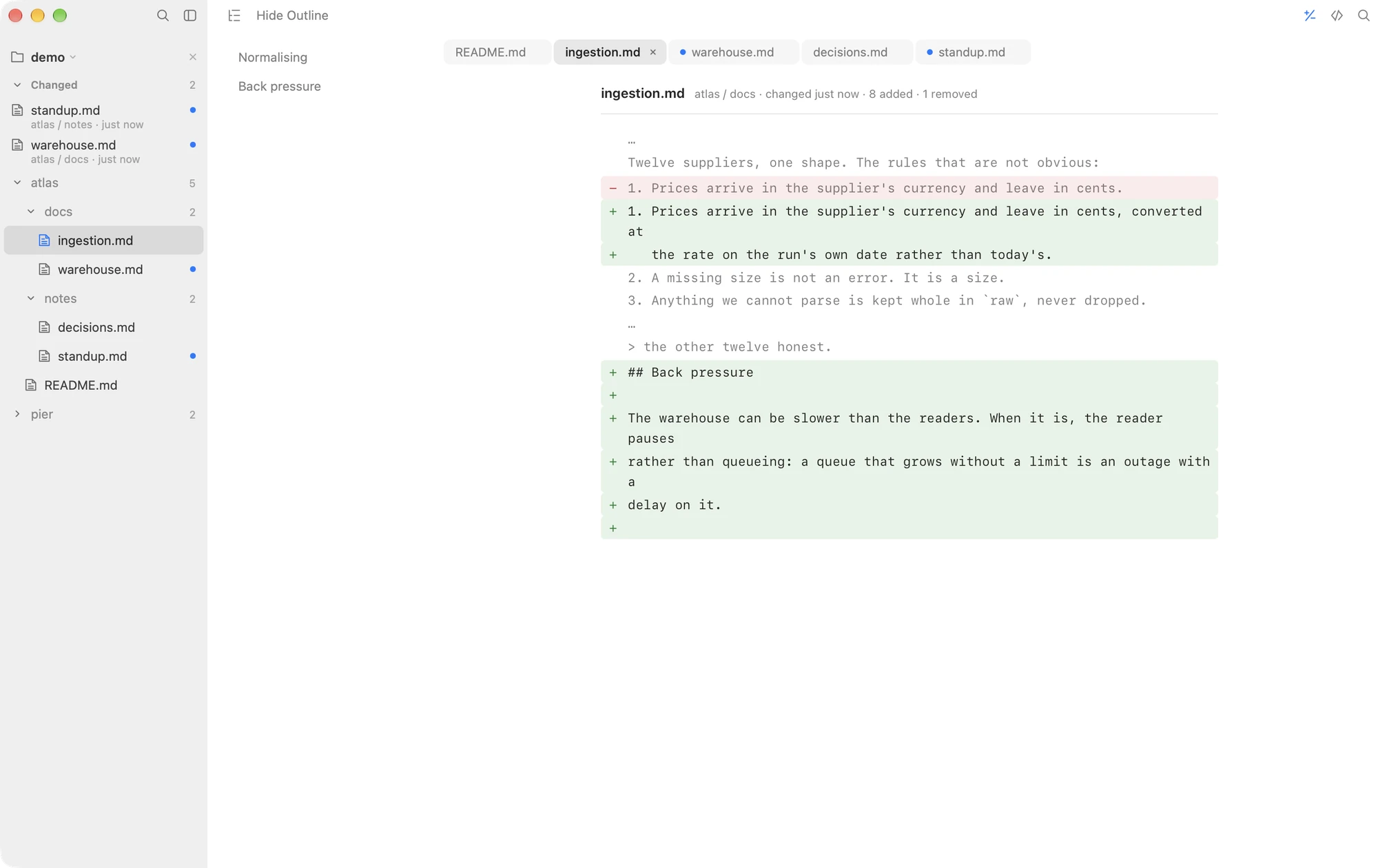
| Macaroni | $14.99 | Read-only viewer that watches a folder: changed feed, and a diff against the version you last read, both remembered across quits; tabs and a window per folder |
| Meva | Free, Pro $14.99 | Read-only viewer for Mac, Windows and Linux with folder browsing and twelve themes in Pro |
| MacMD Viewer | $19.99 | Read-only single-file viewer with live reload and Quick Look, sold outside the Mac App Store |
| Marked 3 | $2.99 a month | Marked's successor, subscription first, with a lifetime unlock |
| Telescopo | $49.99 | Viewer and editor together |
If free is fine, and it often is
The free tier on macOS is good now, and pretending otherwise would be the advert this page promised not to be. mdown is the best of it: a fast, native, notarised viewer with a Quick Look extension, document tabs, live reload, zoom, and interface writing that puts most paid apps to shame. If what you read is READMEs and plain notes, install mdown, pay nobody, and stop reading this page.
Its limits appear when documents get technical. Checked side by side in
September 2026 with one file through both apps: Mermaid diagrams, LaTeX
maths, footnotes, GitHub alerts, emoji shortcodes, YAML front matter,
<details> disclosures and table column alignment all
render as literal markup in mdown. Its file list is also flat and
name-filtered only: a project with fifteen files called
SKILL.md becomes fifteen identical rows, and there is no
full-text search across the folder.
If you want diffs, decide which diff you mean
Several apps on this list can show you what changed in a document, and they answer three different questions. MDViewer ($9.99 Pro) diffs against git history: pick a commit, see the change, colour coded. If your documents move in commits, that is the natural model. MarkdownObserver ($3.99) diffs against a few minutes ago: while it is open, margin markers show what moved, measured from a lookback of ten seconds to ten minutes, and its history starts again when it quits. MarkViewer (free) does a version of the same thing, with a banner when a file changes under it. That model is right for watching an AI agent work live. Macaroni diffs against the version you last read, with no git anywhere: open a file, and ⇧⌘D shows what moved since you last had it open, even if nothing was ever committed and even if you quit the app in between. If your documents are rewritten by an AI agent, a colleague or a build between readings, that is the model that answers the question you are actually asking.
If you read whole projects, not files
Most apps above render a file. A few read a folder, each in its own way: Markdown Better View opens one as tabs, Meva browses one, mdown lists one flat, and MarkdownObserver watches one and opens new files as they arrive. Macaroni keeps the whole tree live as files appear, change and go, floats the documents written since you last read them to the top of the sidebar with unread dots, remembers what you have read across quits so changes made while it was closed still surface, and searches the whole project by content. This is the difference that matters if your reading material is a documentation tree or a repository an AI agent is writing into, and it matters not at all if you open one README a week.
If you want to talk back to the AI agent
A newer group of tools is less about reading and more about replying. MarkViewer (free) lets you highlight passages of an agent's plan, comment inline and hand the agent an editable prompt, and it can run the Claude Code or Codex command line tool itself; its comments are saved as HTML comments inside the Markdown file. Imark (free, open source) takes the same approach. Plannotator (free, open source) skips the viewer entirely: it hooks into an agent's plan mode and opens the plan in a browser page for annotation, then sends the feedback straight back. If your job is steering an agent's plan before it runs, these are the tools built for it. Macaroni deliberately does not write anything into your files, comments included, and has no review loop.
The writers' corner
Marked 2 deserves its reputation: it is a preview companion for people writing long documents in another editor, with export pipelines and proofing tools a pure reader has no business shipping. Its successor Marked 3 moved to a subscription with a lifetime unlock. If your Markdown problem is producing manuscripts rather than reading projects, Marked is the grown-up answer and always has been. Telescopo and Typora ($14.99) are editors with excellent previews, which is a different purchase.
So which one?
- You read simple documents occasionally: mdown, free.
- You only want rendered previews in Finder: QLMarkdown, free.
- Your documents live in git and you review by commit: MDViewer Pro, $9.99.
- You watch an AI agent work live and want themes and notifications: MarkdownObserver, $3.99.
- You want to comment on an agent's plan and send it back: MarkViewer or Plannotator, free.
- You write long-form and need export and proofing: Marked 2, $14.99.
- You read whole projects, and things change while you are not looking, especially if an AI agent is doing the writing: Macaroni, $14.99. The changed feed and the diff both start from your last reading and survive a quit, which nothing else on this list does, and they are the whole reason it costs money in a field with good free apps.
Deciding between two of these? The comparison pages put Macaroni beside MarkdownObserver, MarkViewer, MDViewer, MacMD Viewer, mdown, Marked 2 and QLMarkdown one at a time, feature by feature, with every claim dated.
Macaroni is a fast, read-only Markdown viewer for macOS: open one file like any viewer, or watch a whole folder and see what changed since you last read it. Mermaid, KaTeX, Quick Look, live reload. $14.99, one time, no subscription.
See what it does