See what changed in a Markdown file, without git
A document you read yesterday says something different today, and you want to know exactly what moved. On a Mac there are five real ways to answer that, and four of them need either a second copy of the file or an app that happened to be watching when it changed.
The question comes up constantly once documents change outside your control: a colleague reworked the spec, a build regenerated the release notes, an AI agent revised its own plan. Markdown makes it worse in a particular way, because a rendered document hides its seams. Two versions of a page can look almost identical while a single sentence, the one that mattered, quietly reversed its meaning.
Option 1: git, if the history exists
Where the file lives in a repository and the versions you care about
were committed, git already has the answer:
git diff HEAD~1 -- notes.md, or any GUI client's history
view. The viewer MDViewer ($9.99 Pro) builds this into
a Markdown app directly: pick a commit, see the change colour coded.
The limit is in the premise. Git compares commits, and documents move between commits: five successive saves by an AI agent inside one working session produce one eventual commit and no record of the versions in between, including the one you actually read. If nobody committed the version you remember, git has nothing to compare it against.
Option 2: FileMerge, the Mac's own diff tool
Every Mac with Xcode has FileMerge, and
opendiff old.md new.md opens a proper side-by-side
comparison. It is a good tool. It also requires you to have
old.md: a copy of the earlier version saved somewhere,
which is precisely the discipline nobody maintains for documents they
did not expect to change.
Option 3: your editor's compare command
VS Code and Cursor can diff any two files: right-click one, Select for Compare, right-click the other, Compare with Selected. Same strength, same premise: two files must exist. It shines for comparing a draft against a final, and it cannot answer "what changed since I last read this" because the earlier version was never a file.
Option 4: a viewer that watches while it is open
A couple of Markdown viewers track changes as they happen. MarkdownObserver ($3.99) marks what moved in the margin, measured from a lookback you set between ten seconds and ten minutes, and lets you compare before and after. MarkViewer (free) shows a banner with the diff when a file changes under it. Both are good for watching an AI agent work live. Both keep their history only while they are running: a change made while the app was closed, or a version older than the lookback, has nothing to compare against.
Option 5: a diff against the version you last read
The version you actually want to compare against is not a commit and not a saved copy: it is the document as it was when you last read it. That is the diff Macaroni keeps. With a file open, ⇧⌘D shows what moved since you last had it open, line by line, rendered. No git, no commits, no remembering to save a copy first: reading the file is the act that sets the baseline, and the baseline is kept on your Mac, so it still holds after a quit or a restart.
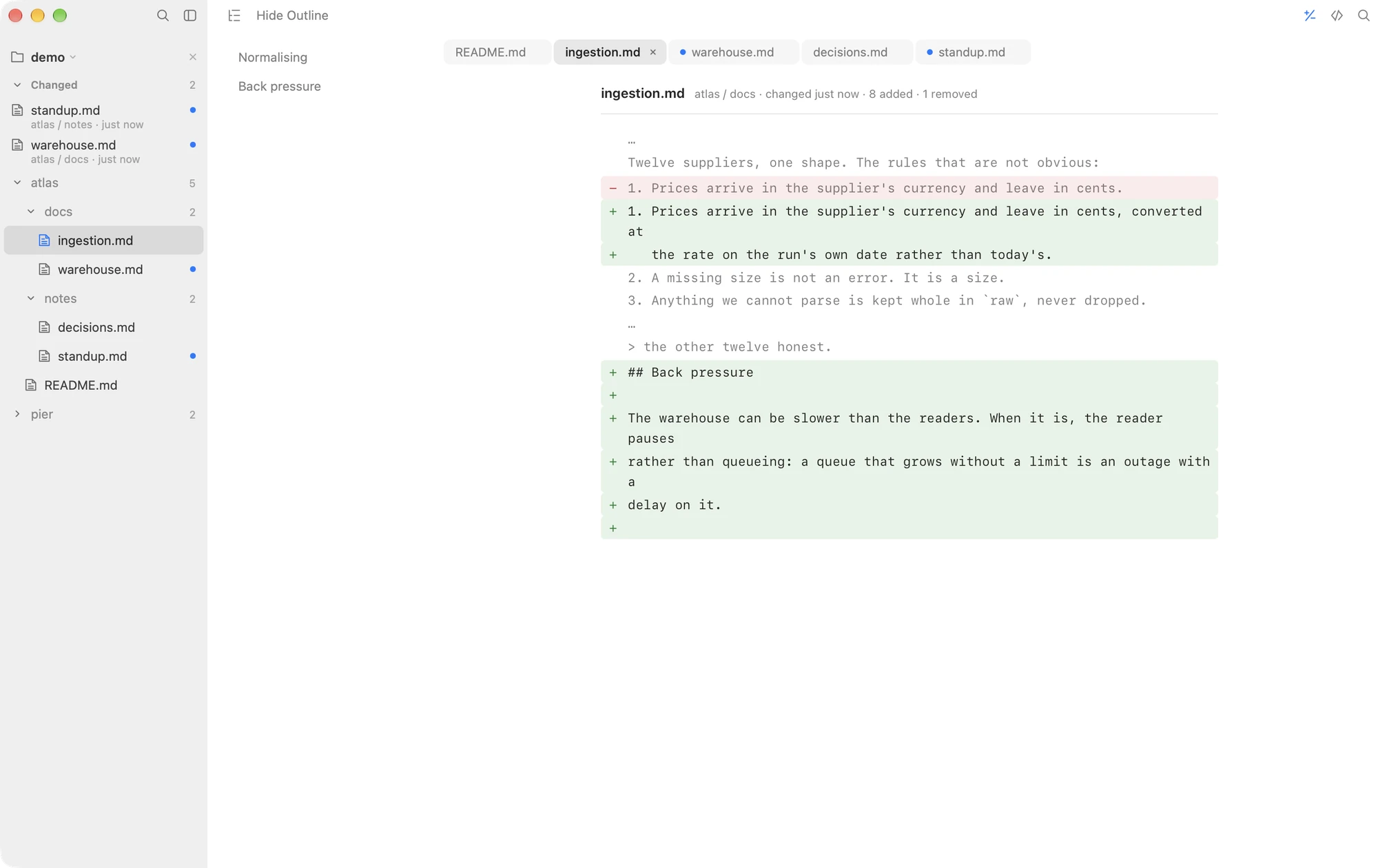
Three details make it usable for real documents:
- The comparison holds still. If the file is saved again while the diff is open, the diff you are reading does not move underneath you; the newer changes wait for the next look.
- The outline shows where. Beside the diff, the document's outline lists the sections the changes fall in, so a two-line edit in a 600-line document is a click away rather than a scroll away.
- The feed says which files. With a folder open, documents changed since you last read them float to the top of the sidebar with unread dots, so the question "what changed" gets answered before the question "in which file" has to be asked.
Which one to use
- The versions were committed: git, or MDViewer if you want it inside a Markdown viewer.
- You have both files: FileMerge or your editor's compare, both free and already installed.
- You are watching the file change right now: MarkdownObserver or MarkViewer.
- The file changed since you read it, perhaps while you were away, and no copy exists: only the last-read model answers this, and Macaroni is where it lives.
Macaroni is a fast, read-only Markdown viewer for macOS with a built-in diff against the version you last read, a watched folder and a changed feed. $14.99, one time, no subscription.
See what it does