How to read Claude Code's plans and CLAUDE.md on a Mac
Claude Code writes Markdown all day: plans before it touches code,
reports after it finishes, and CLAUDE.md in between. The
terminal it runs in is the worst place on your Mac to read any of it.
If you use Claude Code for anything serious, your project fills up with
documents. Plan mode produces a plan you are supposed to approve before
the work starts. Long tasks end with a written report. Research requests
come back as a structured document with headings, tables and checklists.
And CLAUDE.md, the file that steers every future session,
quietly grows into one of the most important documents in the
repository.
All of it is Markdown, which means all of it was written to be rendered: headings with weight, tables with columns, task lists with boxes, code with highlighting. Scrolled past in a terminal, a 40-line table is a wall of pipes and a Mermaid diagram is a paragraph of arrows. You approve the plan without really having read it, which defeats the point of a plan.
Here is every reasonable way to do better, including the free ones.
Option 1: render it in the terminal
glow is the best of
the terminal renderers: brew install glow, then
glow plan.md gives you styled headings, lists and code
blocks without leaving the shell. For a quick look at a short file it is
genuinely good.
Where it stops: wide tables still wrap awkwardly at terminal width, Mermaid diagrams and LaTeX maths stay as source, and the view is a snapshot. When Claude Code rewrites the plan two minutes later, you run the command again and find your place again. It is a reader for a moment, not for a working session.
Option 2: preview in the editor you already have
VS Code and Cursor both render Markdown: open the file and press ⇧⌘V, or ⌘K V for a side-by-side preview. The rendering is decent, it is free, and if you live in the editor anyway it is one keystroke away.
Two frictions in practice. First, an editor's job is editing: the file
opens in a tab that can change it, which is an odd posture for a
document an AI agent owns and is actively rewriting. An accidental
keystroke saved into a plan mid-session is a small disaster you only
notice later. Second, the preview shows one file. Claude Code does not
write one file: it writes a plan here, a report there, an update to
CLAUDE.md, and nothing tells you which of them changed
while you were reading the first one.
Option 3: Quick Look, for a glance
Select a Markdown file in Finder and press Space. Out of the box macOS shows it as plain text; with a Quick Look extension installed it appears rendered. That is ideal for the two-second question, "is this the file I think it is", and no use for actually working through a long plan. We wrote a separate guide to Quick Look for Markdown, including the free options.
Option 4: a dedicated reading window
The pattern that actually works for agent-heavy sessions is two windows: the terminal where Claude Code runs, and beside it a window whose only job is reading. For that second window you want four things, and the fourth is the one almost nothing has:
- Read only. It must be incapable of writing to the files, so it can never race the AI agent for a document or leave a stray edit in a plan.
- Live reload. When the file is saved mid-render, the page should update in place and keep your scroll position, so you read along while the document is being written.
- Real rendering. Claude Code's documents use GitHub Flavoured Markdown hard: tables, task lists, alerts, Mermaid diagrams, the occasional formula. A viewer that renders half of it sends you back to the source.
- Awareness of the folder. The plan is not the only document. You want to come back from lunch and see which files changed since you last read them, without diffing the repository in your head.
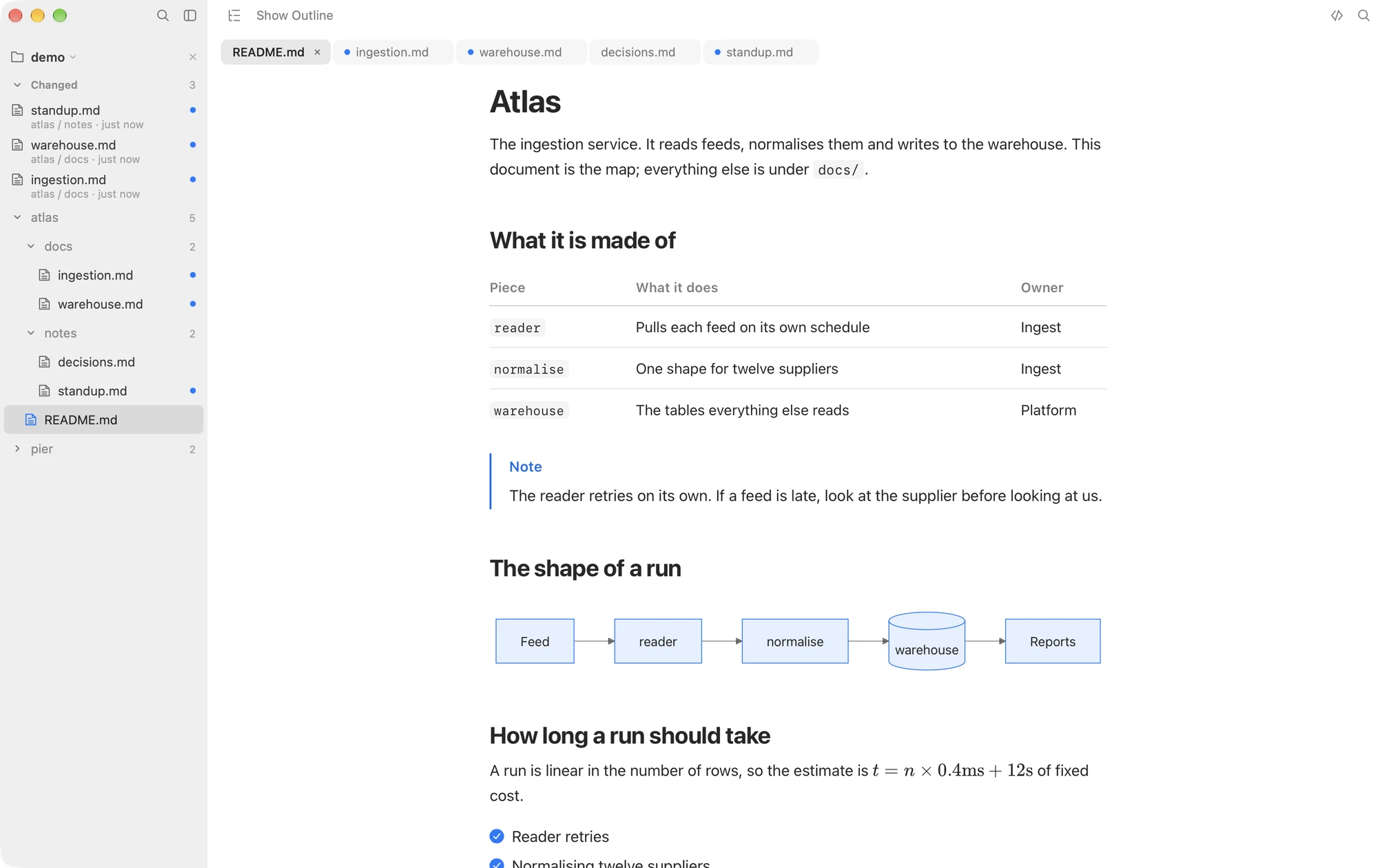
This is the gap Macaroni was built for. Point it at the project folder while Claude Code works. New and rewritten documents surface in a changed feed at the top of the sidebar with a dot beside anything unseen. The open document re-renders as it is saved. And ⇧⌘D shows what moved since you last read the file, line by line, against the version you read rather than against a git commit. When an AI agent revises a 300-line plan, that diff is the difference between re-reading the whole thing and reading the four paragraphs that changed.
It renders what these documents actually contain, Mermaid and KaTeX included, it never writes to a Markdown file, and it makes no network calls of its own, so leaving it open on a folder an AI agent is writing into costs nothing and risks nothing.
Option 5: review the plan and send it back
Reading a plan and replying to it are different jobs, and a newer set of free tools does the second one. Plannotator hooks into Claude Code's plan mode: when a plan is proposed it opens in a browser page where you annotate it, and your feedback goes straight back to the session. MarkViewer and Imark do something similar inside a Mac viewer, saving your comments as HTML comments in the Markdown file for the agent to read on its next pass. If your aim is to steer a plan before it runs, use one of these. They pair with a reading window rather than replacing it: they handle the plan in front of you, not the rest of the folder changing around it. Our comparison with MarkViewer goes into the trade-off of comments stored inside the file.
What about CLAUDE.md specifically?
CLAUDE.md deserves more attention than it gets, because it
is the file with the longest consequences: every instruction in it
shapes every future session. Claude Code appends to it when you ask it
to remember things, and sessions themselves propose edits. It is worth
reading properly at the end of a heavy week, and it is exactly the file
the diff-since-last-read was made for: open it, skim what changed since
you last looked, and catch the instruction that no longer says what you
meant.
The honest summary
- For a quick look at one short file, glow or Quick Look is enough, and free.
- If you read in the same editor the AI agent writes through, the built-in VS Code or Cursor preview is one keystroke away.
- If Claude Code writes documents faster than you read them, a read-only viewer that watches the folder is the tool the workflow actually asks for, and that is what Macaroni is.
- If you want to comment on a plan and hand it back before it runs, Plannotator, MarkViewer or Imark, all free.
Macaroni is a fast, read-only Markdown viewer for macOS, made for reading what AI agents write: a watched folder, a changed feed, and a diff against the version you last read. $14.99, one time, no subscription.
See what it does