Macaroni vs MacMD Viewer: the folder or the file
Two read-only Markdown viewers for the Mac, and the two paid apps most worth comparing. We make Macaroni, so read this knowing that; every claim about MacMD Viewer below comes from its own published pages, and every claim is dated.
The honest starting position: these are the two most similar apps in the field. Both are read-only by design. Both ship a Quick Look extension for Finder. Both render Mermaid diagrams offline. Both re-render the open document when an editor or an AI agent saves it. Both are one-time purchases with no subscription and no account. If the comparison ended at a single open file, you could flip a coin and keep five dollars by picking Macaroni.
It does not end there, because the two apps answer different questions. MacMD Viewer opens a file. Macaroni opens a file or a folder, and the folder is where the two products stop being interchangeable.
Side by side
| Macaroni | MacMD Viewer | |
|---|---|---|
| Price | $14.99 one time | $19.99 one time; Family $39.99 for 3 Macs, Team $129 for 10 |
| Sold through | The Mac App Store | Direct (Stripe checkout), Homebrew, Setapp |
| Opens | A file, or a whole folder as a live tree | A file |
| Changed feed | Yes: files written since you last read them, newest first, with unread dots | No |
| Diff since last read | Yes: line by line, against the version you last read, no git | No |
| Project search | Yes: file names and file contents across the folder | No |
| Live reload | Yes, keeping your scroll position | Yes |
| Quick Look in Finder | Yes | Yes |
| Mermaid diagrams | Yes, offline | Yes, offline |
| LaTeX maths | Yes, KaTeX | No; its own comparison pages state it has no LaTeX or KaTeX rendering |
| Document outline | Yes, over the document, the source and the diff | Yes |
| Themes | One design drawn from macOS itself: system colours, your accent, light and dark live | 12 built-in document themes |
| Zoom and text size | Zoom, plus a text size setting with live preview | Zoom 50 to 300% |
| Print and PDF | Yes | Yes |
| Analytics | None; the app contains no networking code at all | Anonymous usage analytics through TelemetryDeck, per its own disclosure |
| Sandboxed | Yes; it reads only what you hand it | Not stated on its site |
| Minimum macOS | 15 | 14 |
| Refunds | Handled by Apple, at reportaproblem.apple.com | 14-day money-back, by email |
Where MacMD Viewer wins
- Twelve themes. Solarized, Dracula, Nord, sepia and more, picked from a menu. Macaroni deliberately has one design, drawn from the system's own colours; if choosing a document theme matters to you, MacMD Viewer is the app that offers it.
- macOS 14. Macaroni needs macOS 15. On a Mac that cannot go past Sonoma, MacMD Viewer runs and Macaroni does not.
- Distribution choice. A direct DMG, Homebrew and Setapp. If you already pay for Setapp, MacMD Viewer is effectively included in it.
- A track record. It has been on sale longer, with public reviews (4.4 on Trustpilot as its site shows today). Macaroni is the newer product, and it would be silly to pretend that carries no weight.
- Team packs. Multi-Mac bundles on its own store. Macaroni sells one copy per App Store account.
Where Macaroni wins
One sentence covers most of it: MacMD Viewer renders the file you opened, and Macaroni also watches the project you are in. Point Macaroni at a folder and the sidebar becomes a changed feed: documents written since you last read them float to the top, newest first, and reading one clears its dot. ⇧⌘F searches the whole project by file name and content. ⇧⌘D shows what moved in the open document since you last read it, line by line, with the outline naming the sections the changes fall in. Nothing on MacMD Viewer's site offers a tree, a feed, a diff or a project search, because that is not the product it is.
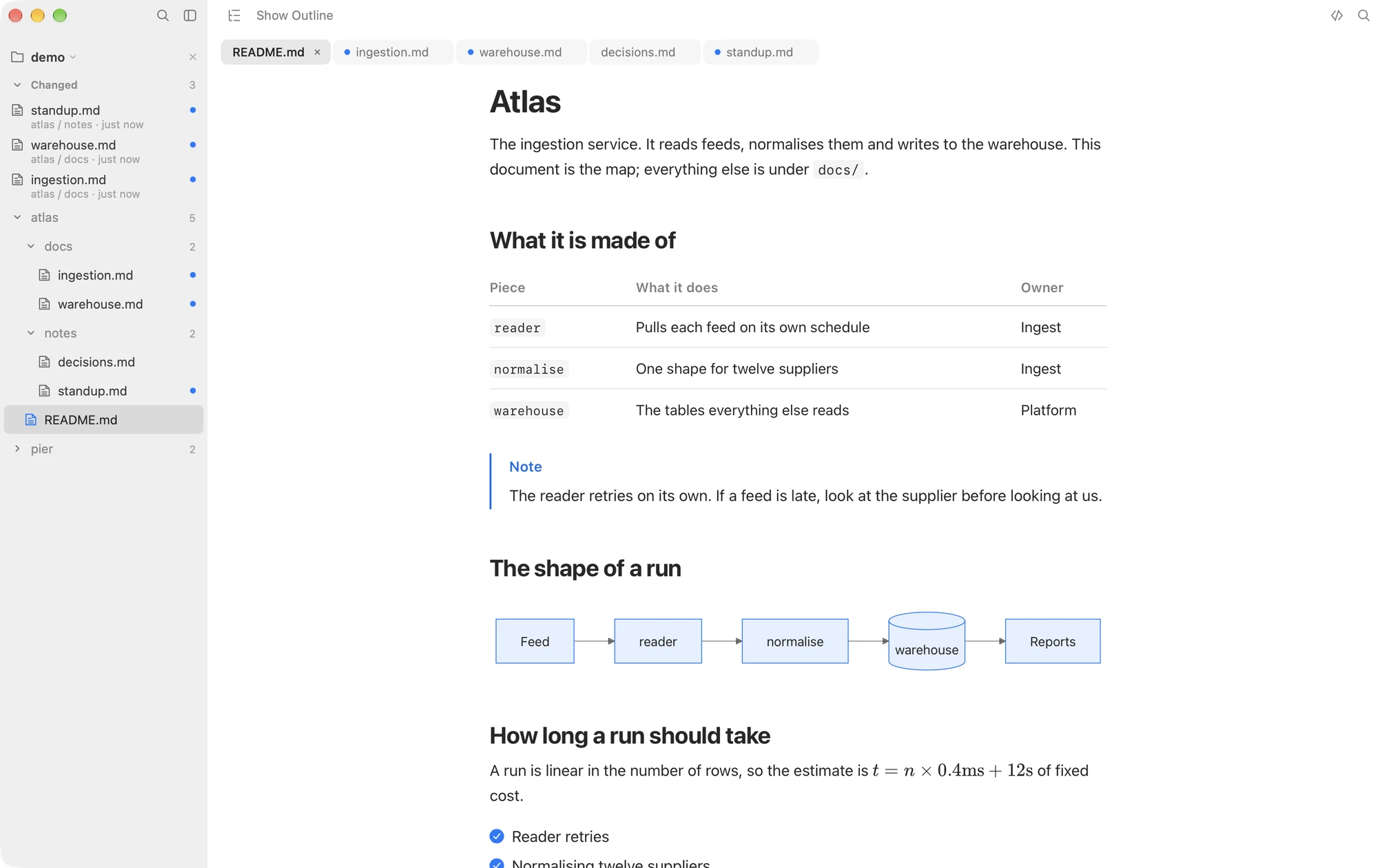
- The diff since last read. Both apps re-render a file when an AI agent saves it. Only Macaroni can then tell you what actually moved, against the version you read rather than against a commit. If documents change faster than you read them, this is the feature that pays for the app.
- Maths. Macaroni renders LaTeX through KaTeX. MacMD Viewer's own comparison pages say plainly that it has no LaTeX or KaTeX rendering at all.
- Nothing phones home. MacMD Viewer discloses anonymous analytics through TelemetryDeck, which is an honest and mild thing as telemetry goes. Macaroni contains no networking code and sends nothing anywhere; scripts in the page it renders your document into may not connect anywhere, and the only thing it loads from the web is an image a document itself links to. There is nothing to disclose.
- Sandboxed, with Apple in the middle. Macaroni runs in the Mac App Store sandbox and reads only the files and folders you hand it, and purchases and refunds go through Apple rather than through the developer.
- Five dollars less, for the app that does the superset of the reading features.
Choose MacMD Viewer if
- You want selectable document themes, and one design is a deal breaker.
- Your Mac is on macOS 14 and staying there.
- You subscribe to Setapp, where it costs you nothing extra.
- You buy for a team and want one email with ten keys in it.
Choose Macaroni if
- You read projects, not just files: documentation trees, repositories, the folder an AI agent is writing into.
- You want to come back and see what changed, as a feed and as a line-by-line diff, without git.
- Your documents contain maths as well as Mermaid.
- You want an app with no analytics and no network code at all, sandboxed, bought through the Mac App Store.
The bottom line
For reading one file at a time with themes, on the widest range of Macs, MacMD Viewer is a good product and this page will not pretend otherwise. The moment your Markdown lives in folders and changes while you are not looking, especially because an AI agent is doing the writing, Macaroni does things MacMD Viewer does not attempt: the tree, the changed feed, the diff since you last read, and search across the project. It also renders maths, collects nothing, and costs five dollars less.
Macaroni is a fast, read-only Markdown viewer for macOS: open one file like any viewer, or watch a whole folder and see what changed since you last read it. Mermaid, KaTeX, Quick Look, live reload. $14.99, one time, no subscription.
See what it does