Macaroni vs Marked 2: which side of the document are you on?
Marked 2 is one of the most respected Markdown apps ever shipped on the Mac, and this comparison will not pretend otherwise. We make Macaroni; the honest way to compare the two is to notice that they sit on opposite sides of the same document: Marked serves the person writing it, Macaroni serves the person keeping up with it.
Marked 2's own site says what it is in its first sentence: a previewer you use with your favourite text editor, updating every time you save, even scrolling to your most recent edit so your attention stays on the writing. Everything about it radiates from that purpose, and it has spent years earning its reputation at it.
Side by side
| Macaroni | Marked 2 | |
|---|---|---|
| Built for | Reading documents other people and AI agents write | Previewing the document you are writing, live, beside your editor |
| Price | $14.99 one time, Mac App Store | US$13.99 direct (non-sandboxed, via Paddle); also sold on the Mac App Store. 7-day free trial direct |
| Watches a folder | Yes: a live nested tree of the whole project | Partially: drop a folder on its icon and it displays the most recently edited file in it |
| Changed feed with unread tracking | Yes | No |
| Diff since you last read | Yes, line by line, no git | No; CriticMarkup support is for changes collaborators mark up in the text itself |
| Project search | Yes, file names and contents across the folder | In-document search, with wildcards and regular expressions |
| Mermaid diagrams | Yes, offline | Not listed among its supported formats on its site |
| Maths | KaTeX | MathJax |
| Markdown dialects | CommonMark and GitHub Flavoured Markdown | MultiMarkdown and Discount built in, plus custom processors, Fountain, CriticMarkup, Scrivener and more |
| Export | Print, and Export as PDF | HTML, PDF and Word, in a wide range of styles, including self-contained HTML |
| Writing tools | None, on purpose | Word counts, reading time, Fog Index and Flesch-Kincaid scores, repetition and keyword highlighting, manuscript formats |
| Quick Look in Finder | Yes | Not listed on its site |
| Minimum macOS | 15 | 10.12 |
Where Marked 2 wins, comfortably
- If you write long-form Markdown, there is no contest and you should buy Marked. The export pipeline alone, HTML, PDF and Word in custom styles, is something Macaroni does not attempt, and the proofing tools (readability scores, repetition highlighting, manuscript formats) have no equivalent here.
- Dialect breadth. MultiMarkdown, Fountain screenplays, CriticMarkup, Scrivener projects, custom processors for anything else. Macaroni renders CommonMark and GFM, full stop.
- Old Macs. macOS 10.12 and later is a decade of hardware; Macaroni needs macOS 15.
- A free trial, seven days, from its own site. Macaroni cannot offer one under the Mac App Store's rules for paid apps, and says so in its FAQ rather than pretending otherwise.
Where Macaroni is the different purchase
Marked's model is one document, the one you are writing, previewed beautifully. Macaroni's model is a project full of documents you did not write, arriving and changing on their own schedule. Point it at a folder and the sidebar keeps the real tree live and floats what was written since you last read it to the top, with unread dots; ⇧⌘F searches every file's contents; and ⇧⌘D shows what moved in a document since you last read it, no commits involved. Marked can show a folder's most recently edited file, which is genuinely useful while writing; it does not track what you have read, list what you have not, or diff against your last reading, because its user is the person doing the writing.
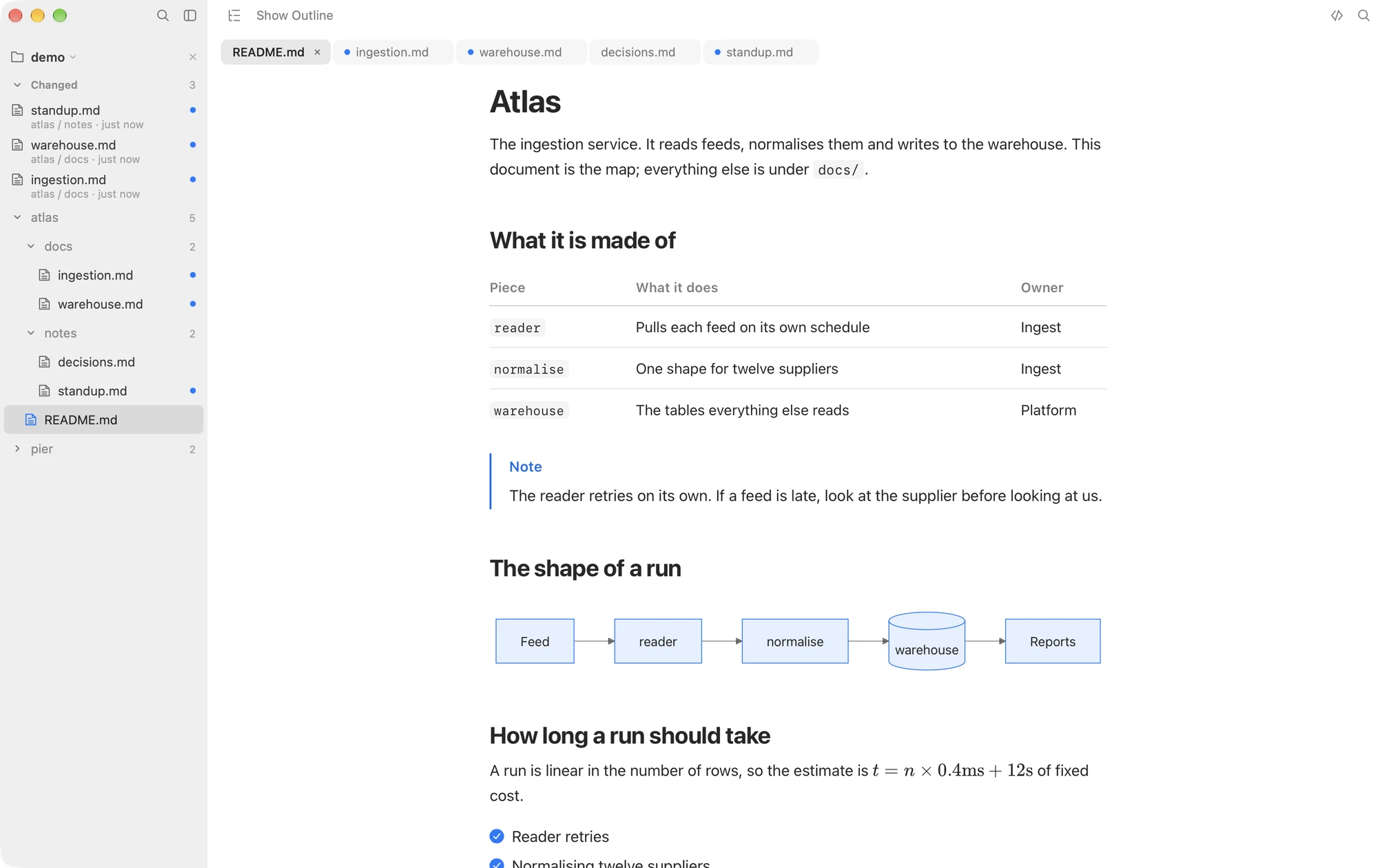
Two smaller differences follow the same line. Macaroni renders Mermaid diagrams offline, which matter more in AI agent output than in manuscripts, and its site does not list Mermaid among Marked's formats. And Macaroni ships a Quick Look extension, so Space in Finder shows the same rendering, where Marked's site does not list one.
Choose Marked 2 if
- You write: blog posts, books, reports, manuscripts, screenplays.
- You need export to Word, styled PDF or self-contained HTML.
- You want proofing analysis while you edit.
- Your Mac predates macOS 15.
Choose Macaroni if
- You read: documentation trees, repositories, and the plans, specs and reports AI agents produce.
- You want the folder watched, the unread listed and the changes diffed against your own last reading.
- Your documents carry Mermaid diagrams and you want Space in Finder to render them too.
Plenty of people are on both sides of the document in the same week, and the honest answer for them is that these two apps do not replace each other: one previews what you write, the other keeps up with what everyone else wrote.
Macaroni is a fast, read-only Markdown viewer for macOS: open one file like any viewer, or watch a whole folder and see what changed since you last read it. Mermaid, KaTeX, Quick Look, live reload. $14.99, one time, no subscription.
See what it does