Macaroni vs MDViewer: two diffs, two different questions
Both apps can show you what changed in a Markdown document, and they answer different questions. We make Macaroni; MDViewer's facts below come from its own site, read the day this page was published, and it deserves a fair hearing because it is a genuinely capable app at a lower price.
First, respect where it is due. MDViewer, by Crocopliers, is a native
SwiftUI viewer with a strong rendering stack: Mermaid diagrams with a
zoomable lightbox, KaTeX maths, highlighting for over 180 languages, a
Quick Look extension covering .md, .json and
.mermaid, PDF export with smart pagination, and a JSON
tree viewer besides. It has a free Lite version, and Pro costs $9.99.
On rendering alone, it is the closest thing to Macaroni in the field,
and cheaper.
Side by side
| Macaroni | MDViewer | |
|---|---|---|
| Price | $14.99 one time, Mac App Store | Free Lite; Pro $9.99, on the Mac App Store |
| The diff | Against the version you last read: no git, no commits, no saved copies | Against git history: pick a commit in the sidebar, see a colour-coded unified diff |
| Works without git | Yes, on any folder or file | The app works anywhere; the diff needs a repository with commits |
| Catches uncommitted rewrites | Yes: the baseline is your reading, not a commit | No: versions that were never committed have no history to diff |
| Changed feed with unread tracking | Yes | No |
| Folder view | Any folder, as a live nested tree | A file tree rooted at the git repository |
| Project-wide search | Yes, file names and contents across the folder | In-document search with a live counter; its site describes no cross-file search |
| Editing | Never; read-only by design | Yes: double-click to edit in place and save |
| Mermaid | Yes, offline | Yes, with an interactive lightbox |
| Maths | KaTeX | KaTeX |
| Quick Look | Yes, the Markdown family | Yes: .md, .json and .mermaid |
| Minimum macOS | 15 | 13 |
The diff question, precisely
Both apps can show a colour-coded, line-by-line change view. The difference is the baseline, and it decides which app answers your actual question.
MDViewer answers: what changed between commits? If your documents move through git with meaningful commit history, its sidebar of commits with one-click diffs is exactly right, and no terminal is needed.
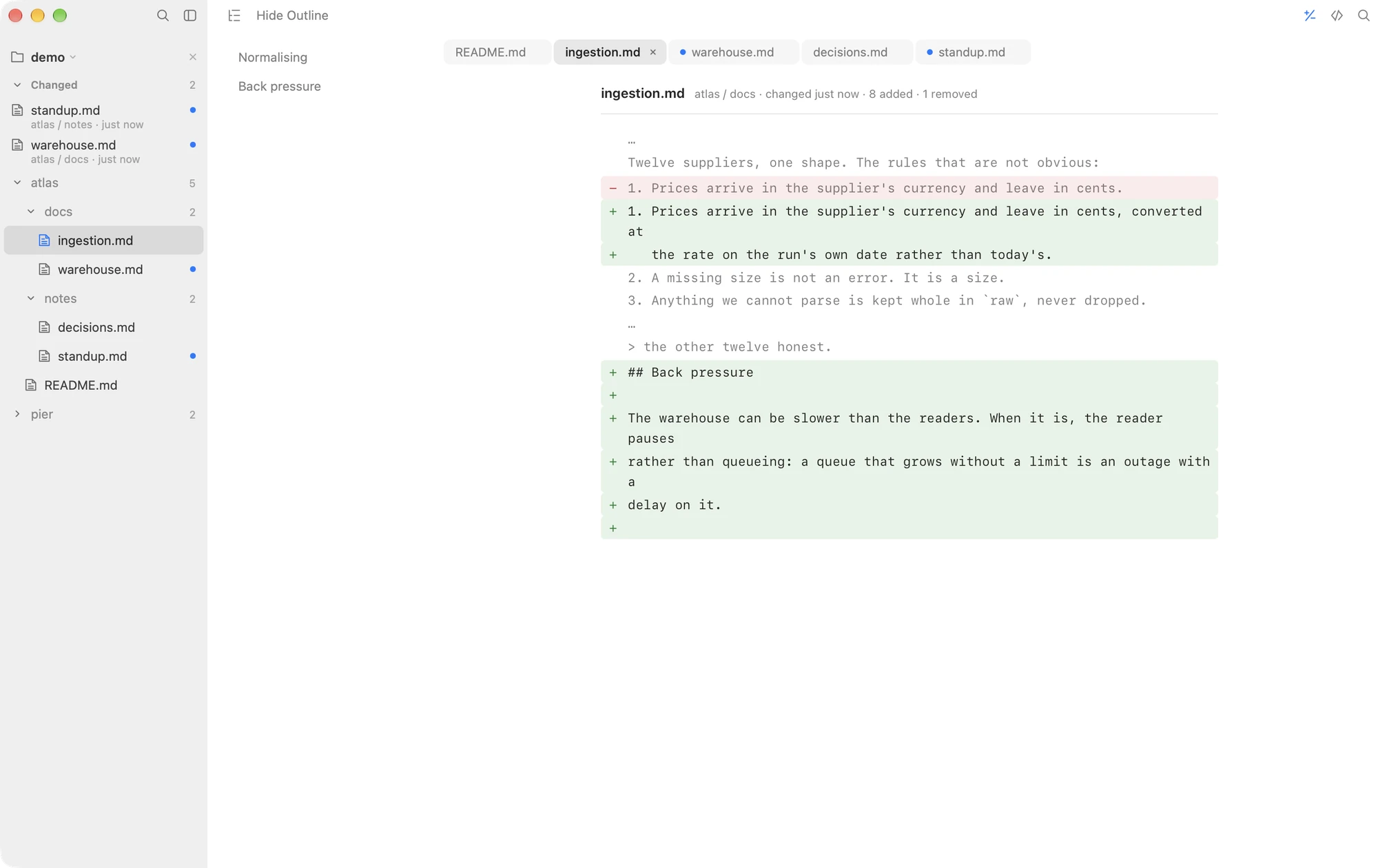
Macaroni answers: what changed since I read this? The baseline is set silently by your own reading, so it catches the changes git never sees: the five saves an AI agent makes inside one working session, the rewrite in a folder that has no repository at all, the spec a colleague edited without committing. Reading the file is the only setup, and the comparison holds still while you look at it even if the file is saved again underneath you.
The other divide: it edits, Macaroni never will
MDViewer's double-click-to-edit is real convenience: fix a typo, save, done. Macaroni deliberately refuses that convenience. It never writes to a Markdown file, which is what makes it safe to leave open all day on a folder an AI agent is writing into: it cannot race the agent for a file, cannot hold a stale buffer over a fresh save, and cannot leave a stray keystroke in a plan. Which side of that trade you want is a workflow question, not a quality one, and it is the clearest single reason to pick one app over the other.
Choose MDViewer if
- Your documents live in git and commit history is the diff you want.
- You want to make small edits in the same window you read in.
- You also read JSON files, or your Mac is on macOS 13 or 14.
- $9.99, or the free Lite tier, is the budget.
Choose Macaroni if
- Documents change between commits, or outside git entirely, and you want the diff against your own last reading.
- You want a changed feed: which files were written since you last read them, newest first, with unread dots.
- You need search across the whole project's contents, not just the open document.
- You want a window that is incapable of writing, because an AI agent owns the files.
Macaroni is a fast, read-only Markdown viewer for macOS: open one file like any viewer, or watch a whole folder and see what changed since you last read it. Mermaid, KaTeX, Quick Look, live reload. $14.99, one time, no subscription.
See what it does