The changed feed
Point Macaroni at a folder and the sidebar answers the question most Markdown viewers leave you to answer yourself: what was written here since I last read it?
Most Markdown apps render the file you opened. That model assumes documents arrive one at a time and hold still, and for years that was true. It stopped being true the day projects started filling with documents nobody sent you: an AI agent's plans and reports, a colleague's spec rewrite, a build's regenerated release notes. The folder changes while you are not looking, and "render the file I opened" has no answer to that.
What the feed does
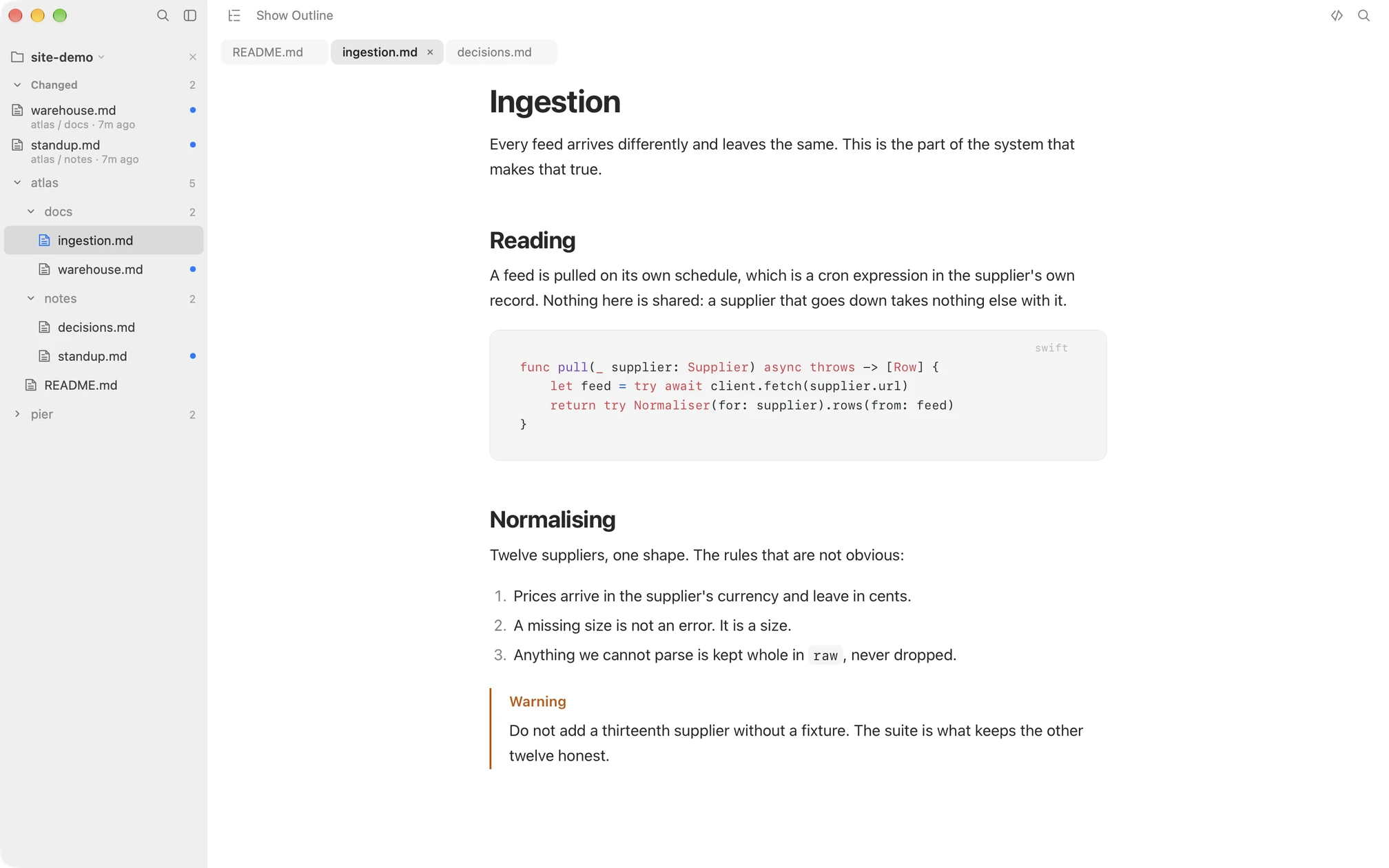
Open a folder in Macaroni, by dropping it on the window, with File > Open Folder, or by pasting a path with ⇧⌘V. From then on the sidebar keeps the folder's real nested tree live as files appear, change and disappear, and above the tree it keeps the feed: every Markdown file written since you last read it, newest first, with a dot beside anything you have not seen.
Reading a file is what clears its dot. Not opening the app, not a timer, not marking things read by hand: the feed tracks what you have actually read, which is why coming back after two hours away feels like opening an inbox rather than playing detective in Finder's date-modified column.
A document that changes while it is on screen counts as read, because you watched it change; What Changed still shows everything that moved since you opened it.
And it remembers. What you have read survives a quit and a restart, so a file rewritten while Macaroni was closed is waiting in the feed the next time you open it, not lost because the app was not watching at the moment it changed.
What it needs from you: nothing
- No git. The feed works on any folder, in or out of a repository, and never touches version control.
- No configuration. There is nothing to set up, index or exclude. Open the folder, and it works.
- No cloud, no account. What you have read is remembered on your Mac, and nowhere else. The app has no networking code at all.
- No writes. Tracking happens entirely outside your files. Macaroni never writes a byte into a Markdown file, which is why it is safe to leave watching a folder an AI agent is working in: it cannot race the AI agent for a file, ever.
Where it changes the workflow
The feed turns "keep up with the project" from a search into a list. During a Claude Code or Cursor session, leave Macaroni open beside the terminal: each plan, report and note the AI agent writes surfaces in the feed as it lands, and the open document re-renders in place as it is saved. After time away, open Macaroni before the terminal: the feed is the agenda, in order. And when a document in the feed is one you have read before, ⇧⌘D shows what moved inside it since you last read it, which is the feed's other half.
Honestly, who does not need this
If you open one README a week, you do not need a changed feed, and the free viewers will serve you well; our comparison of the whole field says exactly which one to pick. The feed earns its keep when documents outrun you. The closest thing to it elsewhere is MarkdownObserver, which marks the changes it sees in a watched folder while it is open and opens new files as they arrive, which suits following an AI agent live. Macaroni's feed is built for catching up instead: it tracks what you have read, across quits, rather than what happened while the app was watching. The head-to-head comparisons lay out the rest app by app.
Macaroni is a fast, read-only Markdown viewer for macOS: open one file like any viewer, or watch a whole folder and see what changed since you last read it. Mermaid, KaTeX, Quick Look, live reload. $14.99, one time, no subscription.
See what it does