What Changed: the diff since you last read
Every diff tool compares two versions. Macaroni's is the only one on the Mac whose baseline is the document as it was when you last read it, remembered after you quit: not a commit, not a timer, not a saved copy, just your own reading.
The question the feature answers is one you already ask: this file says something different from what I remember, so what moved? Git can only answer if the versions were committed, and documents change between commits: an AI agent saves a plan five times inside one working session, and the version you actually read is none of the five. FileMerge and editor compare commands need the old version to exist as a file, which is precisely the copy nobody keeps. The version you want to compare against exists in exactly one place, your memory, and Macaroni's job is to hold it for you.
How it works
Read a document in Macaroni. That is the whole setup: reading it sets the baseline, silently, with nothing written into your file. When the document later changes, press ⇧⌘D and the window shows the difference line by line, rendered: what left, what arrived, what was reworded.
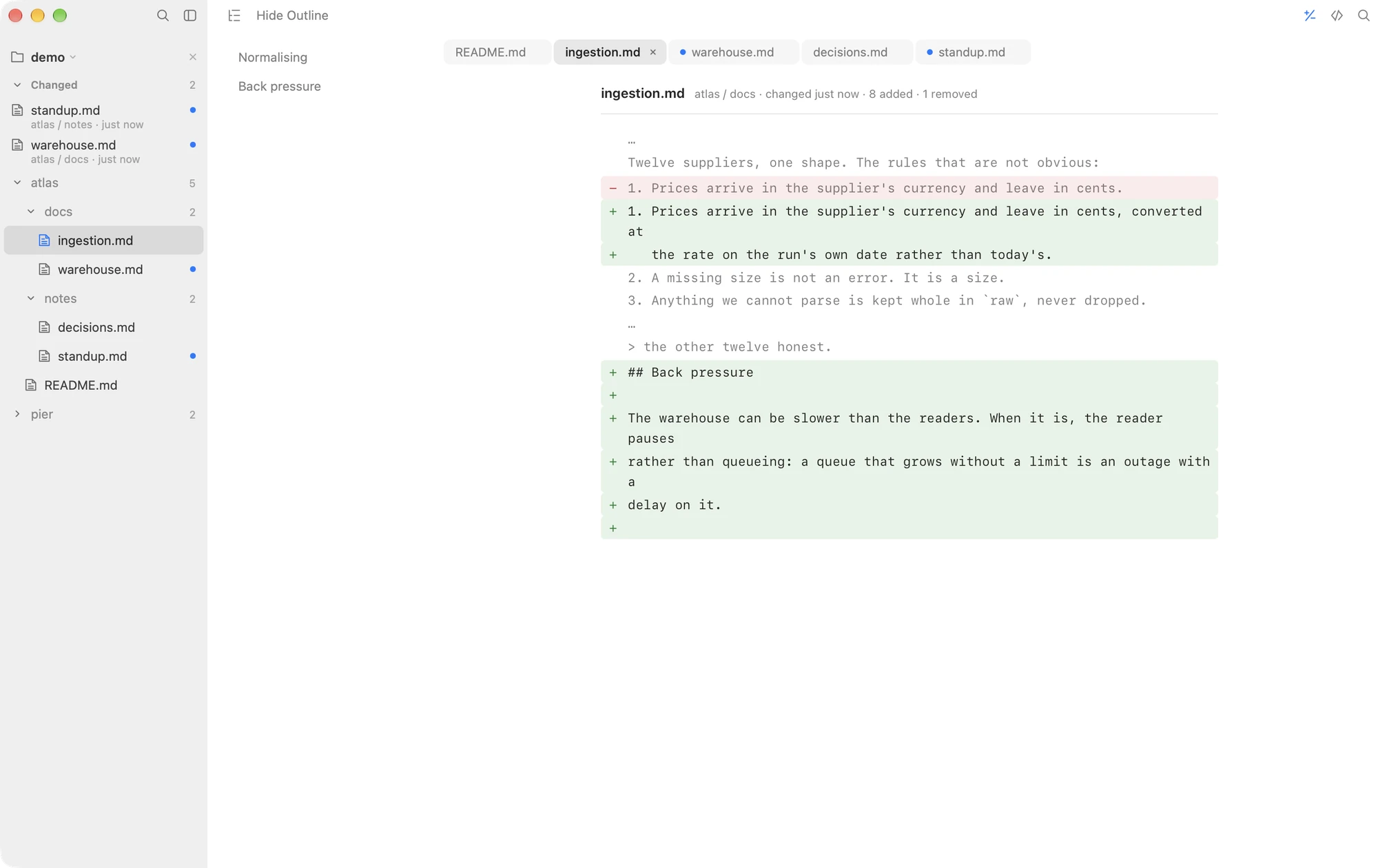
Three decisions make it dependable for real documents:
- The comparison holds still. If the file is saved again while the diff is open, what you are reading does not shift underneath you. The newer changes wait for your next look, so a document being rewritten mid-diff cannot move the goalposts.
- The outline says where. The same outline that follows you down a document works over the diff, listing the sections the changes are in. A two-line edit in a 600-line spec is one click away, not forty screens of scrolling.
- The feed says which files. With a folder open, the changed feed answers "which documents changed" before you ever ask "what changed inside this one". The two features are halves of the same idea.
No git, on purpose
The diff never touches version control, which is a feature rather than a gap. It works on files that live in no repository, on repositories whose documents move between commits, and for readers who should not have to learn git to find out what a spec now says. If your documents do move in commits and that is the diff you want, MDViewer builds a git-history diff into a viewer well; the comparison page covers when each model is the right one. And if you want to watch changes land live, MarkdownObserver marks what moved in the last few minutes while it is open; its history starts again when it quits, where Macaroni's baseline is still your last reading (compared here).
Made for documents AI agents rewrite
This feature exists because AI agents edit documents as fast as they write them. A revised 300-line plan looks almost identical to the old one at a glance, and the one reversed sentence is the whole decision. With the diff, reviewing the rewrite means reading the four paragraphs that changed, at the moment you choose, against the version you saw last. Combined with the app being read-only by design, it makes Macaroni a safe, permanent window onto a folder an AI agent is working in.
Macaroni is a fast, read-only Markdown viewer for macOS: open one file like any viewer, or watch a whole folder and see what changed since you last read it. Mermaid, KaTeX, Quick Look, live reload. $14.99, one time, no subscription.
See what it does